I've released an update that now provides compatibility with iOS 7. The update is iOS 7 only so can only be downloaded to devices that have been updated with iOS 7. However, in addition to the iOS 7 support, there are a fair number of additional enhancements and fixes in this update:
Updated look and feel of app to conform to iOS 7 standards.
Added new "on-device" Bible versions that all support the "touch Hebrew word for definition" functionality. They are:
Hebrew (cantillation)
Hebrew (vowels)
Hebrew (no vowels)
Hebrew/English (cantillation)
Hebrew/English (vowels)
Hebrew/English (no vowels)
Fixed issue which sometimes caused the word definition popups to not appear.
Fixed issue where Hebrew and English texts were not in-synch in Deuteronomy 5.
Fixed broken word link in Genesis 14.5.
Fixed numbering of verses in Psalm 70.
Increased the size of the "X" used to close the word definition popup.
On the iPhone version of the app, the "gear" icon has been eliminated. Now, you can temporarily switch Bible versions or change the app settings using an icon on the main Bible toolbar.
Some miscellaneous fixes/updates.
The new version of the app is now available on the Apple App Store and I recommend that all current users who have iOS 7 on their device download the upgrade (it is a free upgrade for existing users of the app).
And, here are the details (copied from the indiegogo campaign page with some links and formatting added by me) about this - please support it if you can:
Short Summary Help bestselling Yiddishist Michael Wex pioneer a new model for literary translation while rescuing a seminal work of modern Yiddish literature from undeserved neglect.
THE BOOK If you can read Yiddish literature only in English translation, Joseph Opatoshu's 1921 novel, In Poylishe Velder (In The Forests of Poland), is one of the most important works of world literature with which you're probably unfamiliar. A vast panorama of Jewish life in Poland during the 1850s, Opatoshu's novel concentrates on backwoods Jews who live among gentile peasants rather than in Jewish communities in cities or shtetlekh. Touching as it does on hasidism, heresy, pre-Christian Polish folk customs, wife-swapping, messianism, and Polish nationalism, this book will change the way you think about Jewish life in Poland. Those parts not set in the forests or on the road take place in the court of the Rebbe of Kotzk, the last of the classical hasidic leaders. The Rebbe and his court are portrayed so convincingly that even members of the book's original audience often forgot that they were reading a novel and not an intimate history of hasidism in Kotzk. It's the price that Opatoshu had to pay for writing some of the best prose ever published in Yiddish.
THE AUTHOR Sholem Asch and Isaac Bashevis Singer might be better known, but Joseph Opatoshu (1886-1954) was far and away the most important and influential Yiddish novelist of the twentieth century: even Singer, especially in such books as Satan in Goray and The Slave, owes him a considerable debt. Opatoshu is to Yiddish fiction as Hemingway is to American.
He hasn't been well–treated in English, though. Only three of Opatoshu's books have been translated, the most recent, a volume of short stories, in 1968. The 1938 English version of In Poylishe Velder was no more successful as English than it was as Opatoshu. If it's to be properly replaced, a new translation needs to be done immediately: the last native speakers to have learned their Yiddish from people who grew up in pre-WW II Europe, Yiddish-speaking baby-boomers with enough general education to be able to render a sophisticated, allusive and multi-lingual text into an English that doesn't read like a translation, are already beginning to be moved into assisted living facilities.
THE TRANSLATION This urgency was one of the factors that prompted Eric Klein to suggest a crowd-sourcing model as the best way to allow a translator to devote a year of his working life to Opatoshu and nothing else. Translations of literary fiction by long-dead writers who are virtually unknown in English are usually undertaken by academics who receive salaries from their universities; the university presses that publish most such work tend to give only minimal advances on press-runs so small as almost to guarantee tiny royalties. The patronage model that Eric suggested and that I'm proposing–which can be applied to translations from any language–will allow me to spend the next twelve months working on In Poylishe Velder as if it were a book of my own for which I'd received an advance, but with one major difference: I'm going to post the translation on line, where it will be freely available under a creative commons licence so that no one need do anything but type a web address in order to read the book on line or else download a free PDF or e-book once the web version has celebrated its first anniversary. The text will feature tooltip notes (slide the cursor over a Yiddish or Hebrew word to find out what it means) and links to specially made sound files for help with the pronunciation of some of these words. There will be a comprehensive introduction to help acquaint readers with Opatoshu and his work, as well as an afterword (to avoid spoilers that might cut down on the fun of reading the book) to explain some of the issues with which the book is concerned and some aspects of the milieu in which it takes place.
WHY SO MUCH? $75,000 might seem like a lot of money for something without a very elaborate production process, but this project is all about time. Basic expenses–publicity,administration fees, website and recording costs, premiums (including preparation of the e-book and recording the audio) and shipping costs, which we cover–will come to about $23,000. The remaining $52000 (less the Government of Canada's 22%) will allow me a year to give Opatoshu's book the attention it deserves without forcing my family to suffer unreasonably. Because the book will be free, this will be the only money I ever see from it.
The book will never go out of print; it will always be free. Donors will be benefactors subsidizing the spread of Yiddish culture rather than investors or advance purchasers. Dan Opatoshu, Joseph's grandson, has very generously granted me permission to translate his grandfather's work, which is still under copyright: if 3000 people are willing to donate the cover price of a hardcover book, Joseph Opatoshu will be in a position to crack the modernist canon by May 2014. Every contributor's name will appear in a list of donors that will be part of the book. Those so inclined can contribute in honour or in memory of someone else, or even request complete anonymity.
There is nothing to lose. This is a fixed funding project; if the amount of money raised falls short of the $75,000 goal, the project will be cancelled and your contribution automatically refunded (go to http://support.indiegogo.com/entries/21081743-r... for information on Indiegogo's refund mechanism). If more is earned, the surplus will be applied to a translation of 1863, the sequel to In Poylishe Velder.
Over the past 2 weeks, Apple has approved updates for my apps. The latest updates to these apps provide support for iOS 6.0 and the larger (4 inch) screen of the iPhone 5. There were also some minor bug fixes. Here are the links:
The new version of the app is now available on the Apple App Store and I recommend that all current users download the upgrade (it is a free upgrade for existing users of the app).
After installing the update, you should make certain that the app isn't running in the background. If the app was running in the background when you downloaded the update, the "old" database location will still be the one that is being used. If the app is running in the background, you should do one of the following:
Close the background app (double-press the home button, press and hold the icon of the app until it starts to "wiggle", press the red "-" to remove it from the background).
Do a full power off and power on of the device (hold down home button and power button and slide the slider and the power back on again).
Delete the app from your device and re-install it from iTunes.
Options #1 and #2 are faster and easier to do but may not work in all cases (depending on when you took the iOS 5.1 update and a number of other factors). The solution that will work in every case is #3. So, it's best to delete the app from your device and reinstall it from iTunes (after you've downloaded the latest update with iTunes). Here are step by step instructions for doing this (in these instructions, I talk about the HebrewBible app but the same approach works for the BiblicalHebrew and YiddishBible apps as well):
Attach your device to the USB sync cable and start up iTunes.
Click on the "Apps" icon (in the left-hand sidebar) and then click on the "Check for Updates" link (in the bottom-right of the right-hand pane of the iTunes window). Download the HebrewBible app update to your Mac/PC.
Click on your device icon (in the left-hand sidebar) and then click on the "Apps" tab (at the top of the right-hand pane of the iTunes window).
Scroll down through the list of apps on your device until you see the HebrewBible app. It will have a check mark next to it (showing that it is installed on the device). Remove the checkmark and click the "Sync" button (at the bottom-right of the iTunes window). This will remove the HebrewBible app from your device but will keep it in your iTunes repository.
Once you have verified that the app is no longer on your device, you will reinstall it from iTunes. To do this, you repeat the above steps except, this time, you add the check mark to the HebrewBible app in iTunes. After the "Sync", the HebrewBible app will be reinstalled.
Disconnect the device from iTunes and the USB sync cable.
Startup the HebrewBible app. The first time it starts, there will be a delay while the startup "splash" screen is being displayed. During this first startup, the app copies some files and does some initial setup. This will only occur the first time you start the app. Don't cancel the startup - just wait until it completes.
The new versions of the apps are now available on the Apple App Store and I recommend that all current users download the upgrades (they are free upgrades for existing users of the apps). Once again, my apologies for any inconvenience this has caused.
I've just found out that a change in the way Apple stores databases in iOS 5.1 (the version of iOS that was released this week) causes a problem in my apps (the words/dictionary functionality won't work). Therefore, if you use my Hebrew Bible, Biblical Hebrew, or Yiddish Bible apps, you should hold off upgrading to iOS 5.1 until Apple has approved my next version of these apps. I've submitted the fix to Apple and hope that the new versions will be available early next week.
I've released a version 5.2 update. This update changes the default font from Times to Ezra Sil SR in order to provide better display of cantillation. There are many alternative fonts provided (change them via the Settings app) but many users never change the default font so this change provides an improved "out-of-the-box" experience.
The new version of the app is now available on the Apple App Store and I recommend that all current users download the upgrade (it is a free upgrade for existing users of the app).
Normally, when I provide incremental upgrades, I just increment the version number by ".1". However, this second version of the Yiddish Bible application has so many enhancements, I have made it a "2.0" release. I'm quite excited about the new functionality and hope current users will be too. The new version of the app is now available on the Apple App Store and I recommend that all current users download the upgrade (it is a free upgrade for existing users of the app). The following changes were made in this version:
In the Bible display, touching any Yiddish word will bring up a pop-up window with the English definition of that word. For people who are not fluent in Yiddish, this is an extremely useful function!
In the 2-letter word search, the app will first bring up a list of ranges of word matches which, when one is touched, will display the individual words and their definitions. This greatly speeds up word searches.
A different font has been chosen for the display of Yiddish words. With this font, "pasekh tsvey yudn" and "khirik yud" character combinations are displayed with "raised" vowels (as is customary in Yiddish).
Improved access to an Internet copy of the 1910 edition of "Harkavy's Yiddish/English, English/Yiddish Dictionary" is included as part of the app.
The font size has been increased in the word search displays to improve readability.
Some minor bug fixes and cosmetic changes were made.
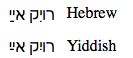
Sometimes the little things take the longest time to get right. After release #1 of my Yiddish Bible iPhone/iPad app, I started to get some feedback on things people liked and things they thought could be improved. Refoyl Finkel pointed out that the Ezra font that I was using for the Yiddish text didn't "raise" the vowels in the traditional Yiddish manner. Both the Hebrew and Yiddish languages use the same Hebrew Unicode character set (the range x0590 - x05ff). However, in Yiddish, for the "pasekh tsvey yudn" and "khirik yud" character combinations, the convention is to "raise" the vowel. This is done for Yiddish only, not Hebrew (which displays the pasekh and khirik in the same "lowered" position all the time), and these 2 character combinations are the only ones that are traditionally displayed differently in Hebrew and Yiddish. The following illustrates the correct positioning for Hebrew and for Yiddish:
However, getting this right wasn't simply a matter of changing fonts! In order to display the vowels in a "raised" manner for Yiddish text in a standards-compliant manner, the following should be done:
When you want to display the characters in the Hebrew (lowered) manner, you need to specify 'lang="he"' for the text that is being displayed. When you want to display the characters in the Yiddish (raised) manner, you need to specify 'lang="yi"' for the text that is being displayed.
The font that you are using needs to support different glyphs for Hebrew and Yiddish, differentiated by language.
The browser that you're using needs to be able to display the correct glyphs from the font based on the lang attribute that is specified.
So, #1 was just a simple matter of programming; however, #2 and #3 were a bigger issue. The problem is that very few fonts support different glyphs for the "pasekh tsvey yudn" and "khirik yud" character combinations. Also, until recently, no browser correctly displayed the different glyphs even if they were supported in the font.
Refoyl and I experimented with a number of different fonts. The GNU FreeFont fonts were one of the few fonts that actually had different glyphs to support display of both raised and lowered pasekh/khirik vowels. I chose the FreeSans font that is part of that package. However, although the FreeSans font did raise the pasekh in the "pasekh tsvey yudn" character combination, it didn't raise the khirik in the "khirik yud" character combination. I did some hacking on the font and came up with a fix that always raised the vowels for the "pasekh tsvey yudn" and "khirik yud" character combinations. This worked ok for me because I was only going to display Yiddish text with the font. However, it wasn't suitable as a general-purpose fix because the font (with my fix) would display the "pasekh tsvey yudn" and "khirik yud" character combinations with raised vowels all the time (regardless of whether the language was Yiddish or Hebrew). I therefore submitted my problem along with my hack as a bug report on the FreeFont bug list (see here for the details). After some exchanges with Steve White (the primary FreeFont developer), Steve came up with a fix. So, I now had solutions for #1 & #2. The browser issues still had to be resolved though as no current browser would correctly differentiate between Hebrew and Yiddish based on the 'lang' attribute.
Steve had previously submitted a bug report for Firefox for this issue (his bug report related to the use of different glyphs for Cyrillic text with Serbian/Macedonian instead of the usual Russian ones; however, the issue was the same as the Hebrew/Yiddish issue). So, he added my comments to his bug report (see the comments at the end of the Firefox bug report here) and I'm please to be able to report that this issue is now fixed in Firefox 10.0! However, in order to use Steve's latest font mods in my Yiddish Bible app, I needed the fix to be done in Mobile Safari as well since I was using a UIWebView control in my app to display the Yiddish text. Since Safari is Webkit-based, Steve suggested that I submit a bug report to Webkit and he would back up my bug report. Therefore, I submitted the bug report and Steve submitted his related Cyrillic example and we are hoping that the Webkit fix will be forthcoming soon (the Webkit bug report is here).
So, although I now had a fix for the font and a fix for Firefox, I still didn't have a fix for Webkit (which I would need if I wanted to use Steve's latest font in my app). So, in the end, I decided to use my original hack of his font in my app as it would allow me to display Yiddish character combinations correctly and I wasn't going to use the font for Hebrew. I've made the necessary changes and Version 2.0 of the app (which contains a number of other enhancements that I'm quite excited about) has been submitted to Apple for approval. When it gets into the App Store, I'll post about the new features.
Since I've modified the font, I've posted my mods along with the original source code here: GNU FreeFont mods. You can see my mods by diff'ing the "FreeSans.sfd" file with the original "FreeSans.sfd~" file. The mods are also documented in my FreeFont bug report. So, if you're looking for a nice font for Yiddish and you need it now, feel free to grab my modified FreeSans font. If you can wait until Steve's next release of the FreeFont fonts comes out and browser support catches up as well, then that's going to be better long-term as I eventually hope to switch over to the standard font once Webkit is patched.
If you do a search on the Apple iTunes App Store for "Bible", you will see the (literally) hundreds of Bible applications that are available. If you narrow your search to "Hebrew Bible" or "Jewish Bible", you will still get dozens of results. However, if last week you had searched for "Yiddish Bible", you would not have seen a single Yiddish Bible application. Now, that is no longer the case - my Yiddish Bible app is available on the app store. With the ability to toggle between Yiddish-only and Yiddish/English, Yiddish/Transcription, Yiddish/Hebrew parallel formats and with a built-in Yiddish/English dictionary, it is also a very useful app for people who are either learning Yiddish or who are trying to improve their knowledge of Yiddish.
Joshua Jacobson's book Chanting the Hebrew Bible: The Complete Guide to the Art of Cantillation (Amazon link) is a fantastic and wonderful resource for anyone who has an interest in either Hebrew chanting or cantillation. However, one issue that I have with the book is that there is no index. The book is about 1,000 pages long and, although it does have a very good Table of Contents, it would really benefit from having an index. I've exchanged emails with the author and he has indicated that any future update (if there is one) will have an index. I googled around a bit to see if anyone else had any supplementary material that would be useful. On Len Fellman's site, I found an index that he had compiled listing all of the scripture references in the book along with page numbers and chapter subheadings. Although the verse index that I found on Len Fellman's site was good to print out, it was not very useful for interactive searching. So, I spent some time converting it into an Excel spreadsheet (I also had to "rationalize" some of the section names that Len used as he wasn't entirely consistent). Now it can be used interactively (you can sort by page#, verse, etc or use any of the other data functions that are available in Excel). You can download the spreadsheet from here.
Hot on the heels of the Version 5.0 update to my HebrewBible App, I've released a version 5.1 update. This update adds support for local audio files (previous versions would stream audio over the Internet - this version allows the user to either stream audio or store it on their device and access it without an Internet connection). I had expected that this enhancement would take a lot longer to do (which is why it wasn't included in the 5.0 release); however, it's amazing what a few late-night development sessions will do! This enhancement will allow users to store and access on their devices either the standard audio (that is currently streamed over the Internet) or their own audio files. This could be useful for use with Bar/Bat Mitzvah audio training files or if you simply prefer a different set of audio readings of the Tanach or if you simply want to have the audio files on your device so that you can use them when you don't have Internet connectivity. Be aware that there are certain standards that you must conform to if you use your own audio files. Also, be aware that storing the audio files on your device could consume a significant amount of storage space. Full setup instructions are located here.
The new version of the app is now available on the Apple App Store and I recommend that all current users download the upgrade (it is a free upgrade for existing users of the app).
This is a fairly major release since I've added an additional "Hebrew/English (reader)" Bible version to the app. This version is based on the Leningrad Codex Hebrew text and the JPS 1917 English text. As with the "Hebrew (reader)" version, it provides word-lookup functionality when Hebrew words are touched and the Hebrew text has full vowels and cantillation. The new version of the app is now available on the Apple App Store and I recommend that all current users download the upgrade (it is a free upgrade for existing users of the app). The following changes are in the HebrewBible App update:
Enhancement: Added "Hebrew/English (reader)" Bible version which provides a parallel Hebrew/English version of the Tanach with support for Hebrew word lookups (by touching on a Hebrew word, the definition is displayed with buttons to display verses or relevant page from BDB).
Enhancement: Changed word translate functionality from Google Translate to Microsoft Bing Translate.
Enhancement: Built with iOS SDK 5.0 but will run on any iPhone, iPad, iPod Touch with at least iOS 3.0.
Enhancement: Changed cache functionality so that cached Bible data is not backed up to iCloud (better performance, doesn't impact user iCloud storage limits, and is in keeping with Apple's iCloud guidelines).
Fix: Audio was sometimes not terminating properly on iPad.
Fix: Minor cosmetic fixes.
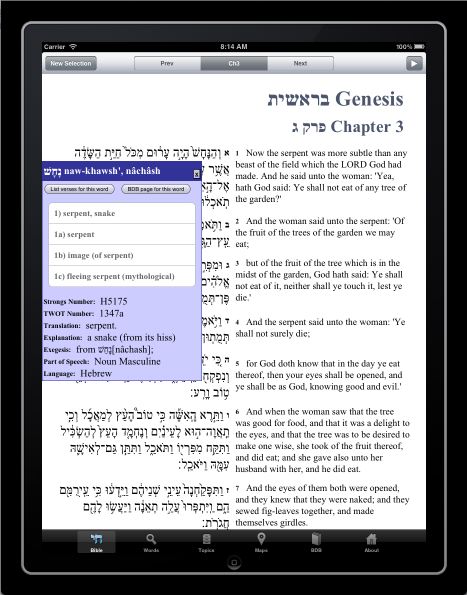
Here is a screenshot of the new "Hebrew/English (reader)" Bible version (shown after touching the Hebrew word for "serpent" and displaying the word-lookup definition information):
Rabbi Ari Sytner has created a great presentation titled ”Judaism In The 21st Century: How The iPhone Is Changing The Way We Observe The Torah“. In it, he reviews a lot of the currently-available iPhone/iPad apps that have Jewish content, including my Hebrew Bible app. The youtube movie of his presentation is broken down into 3 parts (Part 1, Part 2, and Part 3). There is also a nice summary (with links to the apps referenced in the presentation on "The Jewish iPhone Magazine" site. The section of the presentation where Rabbi Ari Sytner discusses my Hebrew Bible app is at the beginning of Part 2 (the first 3.5 minutes of the clip) in which he looks at the Hebrew/English Tanakh version, the verses lookup, and the maps functionality in the app.
As with my recent HebrewBible version update, this update is a bunch of usability updates that I've been meaning to do for a while. The new version is now available on the Apple App Store and I recommend that all current users download the upgrade (it is a free upgrade for existing users of the app). The following changes are in the BiblicalHebrew App update:
Enhancement: Added Prev/TOC/Next buttons (segmented control) to Dictionary tab's version of BDB page display so that the user can navigate in the BDB more easily when accessing the BDB from the word definition popup from that tab.
Enhancement: iPad enhancement to display (depending on orientation) portrait or landscape-specific splash screen on startup.
Enhancement: Built with iOS SDK 4.3 but will run on any iPod Touch, iPhone, or iPad with at least iOS 3.0.
Fix: Fix for bug that was preventing dictionary display of 2-letter words that ended in a 'sofit' character.
It's been a few months since I've posted an update (due to personal and work issues) so this one is a bunch of usability updates that I've been meaning to do for a while. The new version is now available on the Apple App Store and I recommend that all current users download the upgrade (it is a free upgrade for existing users of the app). The following changes are in the HebrewBible App update:
Enhancement: Added Prev/TOC/Next buttons (segmented control) to Bible tab's version of BDB page display so that the user can navigate in the BDB more easily when accessing the BDB from the word definition popup of the Bible.
Enhancement: Added Prev/TOC/Next buttons (segmented control) to Words/Dictionary tab's version of BDB page display so that the user can navigate in the BDB more easily when accessing the BDB from the word definition popup from that tab.
Enhancement: iPad enhancement to display the last Bible chapter previously selected on startup.
Enhancement: iPad enhancement to display (depending on orientation) portrait or landscape-specific splash screen on startup.
Enhancement: Support display of settings in both Portrait and Landscape orientations (previously only displayed in Portrait orientation).
Enhancement: Built with iOS SDK 4.3 but will run on any iPod Touch, iPhone, or iPad with at least iOS 3.0.
Enhancement: Changed the temporary Bible version Menu Bar Button to a regular Button to better conform to Apple HIG (Human Interface Guideline) standards.
Fix: Fix for bug that was preventing dictionary display of 2-letter words that ended in a 'sofit' character.
Other: Some minor UI fixes/adjustments were made for improved usability.
This is a minor update to add support for iOS 4.2 to the app. The primary user-noticeable benefit will be support for multitasking on the iPad. The new versions are now available on the Apple App Store and I recommend that all current users download the upgrades (they are free upgrades for existing users of the apps).
There is 1 fairly significant enhancement as well as some iPad-specific mods and bug fixes in this version. The new versions are now available on the Apple App Store and I recommend that all current users download the upgrades (they are free upgrades for existing users of the apps). All of the following changes are in the HebrewBible update and the first two are also in the BiblicalHebrew update:
Enhancement: Added Search functionality to Words - if you know the English equivalent of a Biblical Hebrew/Aramaic word, you can search for all words that contain that text in one of their definitions. This function supports wildcards (see below for examples) as well.
Enhancement: Built with iOS SDK 4.1 but will run on any iPod Touch, iPhone, or iPad with at least iOS 3.0.
Enhancement: This version contains a number of iPad-specific enhancements to better conform to Apple HIG (Human Interface Guideline) standards. (The Temporary Bible Version change picker is now displayed in a popover element, the "Read Book" button has been replaced with an "Entire Book" switch setting).
Fix: Re-instated "Translate" button in Words tab on the iPad.
Fix: Some minor fixes were made, fixed issue where switching to next/prev chapters was positioning incorrectly sometimes.
With the new search functionality, "wildcards" can be used (e.g. - you can use a "_" character to represent any single character and a "%" character to represent any number of characters). An example of the search wildcard feature might be useful to understand how wildcard characters can be used - the following show examples of the type of results that would be returned for different searches:
a. Searching for "man" locates all Hebrew words that have the those 3 consecutive characters somewhere in the definition for the word (so, for example, it picks up definitions that contain the words "manger, "Manasseh", "man"):
b. Searching for "ma_n" locates all Hebrew words that have the characters "ma" followed by some other character (which is represented by the "_") and then an "n" somewhere in the definition for the word (so, for example, it picks up definitions that contain the words "magnificence", "remain", "Maon"):
Searching for "% man %" locates all Hebrew words that have the unique word "man" somewhere in the definition for the Hebrew word:
After the release of version 4.4 my Hebrew Bible app last week, I had reports from users who were still using iOS 3.0 or 3.1 that they were experiencing crashes on startup. This issue also affected my Biblical Hebrew 1.0 app. I identified the problem and submitted emergency fixes for both apps to Apple last Friday. Apple has approved the fixes and they are now available in the Apple App Store as free updates. All users should download these new versions. My sincere apologies for the inconvenience this has caused for iPhone and iPod Touch users who are still using iOS 3.0 or 3.1.
Hot on the heels of my brand new Biblical Hebrew app is the release of version 4.4 of my Hebrew Bible app! This version is a minor update that is primarily for improved iPhone iOS 4 and iPad functionality. The new version is now available on the Apple App Store and I recommend that all current users download the upgrade (it's a free upgrade for existing users of the app). The changes:
Enhancement: Fast app switching in iOS 4.
Enhancement: Pickers now displayed in popover element on iPad to better conform to Apple's HIG (Human Interface Guideline) standards.
Enhancement: Improved default viewing size of Root pages when "Big Text" is set off.
Users who have both the Biblical Hebrew and Hebrew Bible apps will find that the multitasking (fast app switching) in iOS 4 makes it very convenient to quickly toggle between the two apps while maintaining the current "context" in each app.
My latest app is now available on the app store: Biblical Hebrew (or goto iTunes). The Biblical Hebrew application is designed for learning (or improving ones knowledge of) Biblical Hebrew and Aramaic. It is a "universal application" (e.g. - you only buy it once and it runs on any of the iPhone, iPod Touch, and iPad devices that you own) and it is entirely self-contained (e.g. - no Internet connection is required). The application is comprised of three main components (each represented by a separate tab-bar tab in the application)
Dictionary: The Dictionary tab provides two quick mechanisms to lookup Hebrew words:
Roots: One of the really beautiful aspects of the Hebrew language is that all of the roots of the verbs and nouns are derived from two-letter units that are usually assembled as part of a three letter root. By selecting the first two letters of the root, a listing will be displayed of all Hebrew and Aramaic words (Aramaic words will display in green in the summary) that begin with those two letters with a brief English translation. Once the list is displayed, tapping on a word will display a popup with further detail about the selected word. It is also possible to display a list of all the verses in the Hebrew Bible that contain that word or the BDB page for that word.
Strongs: If you know the Strongs number of a Biblical Hebrew/Aramaic word, you can go directly to the detail information about that word.
The Dictionary definition popup for a word includes (when applicable):
The Hebrew (with vowels) representation.
The phonetic pronunciation of the Hebrew.
The Strongs transliteration of the Hebrew.
The Strongs#.
The language classification (Hebrew/Aramaic/Name).
The part-of-speech.
A button to access a list of all verses in the Hebrew Bible where that word appears.
A button to access the BDB page related to that word.
Common definitions.
Common translation.
Explanation.
Exegesis.
TWOT (Theological Wordbook of the Old Testament) number reference.
Lexicon: The Brown-Driver-Briggs (BDB) HebrewLexicon is probably the most commonly used Biblical Hebrew Lexicon. A complete copy of this lexicon is accessible from within the application. In additon, individual pages can be displayed via the Dictionary word lookup functionality.
Grammar: Gesenius' Hebrew Grammar is the standard Biblical Hebrew reference grammar in English. A complete copy of this grammar is accessible from within the application.
Note: Due to the density of the text in the Lexicon and Grammar texts, this application is best viewed on an iPad. However, it is still very usable on an iPhone or iPod Touch (the Lexicon and Grammar texts will be best viewed on those devices in either Landscape orientation or by "pinch zooming" the text).
I really like programming with the Lisp programming language and, even though I rarely do much Lisp programming these days, it has affected how I program in other languages. In the past, I've blogged a lot about both Lisp macros and continuations; however, I still occasionally get questions from non-lispers regarding Lisp macros and continuations as most programming languages don't support them to the same extent that Lisp does. It's understandable that many people struggle with grok'ing the concepts as it's kinda like the Bedouin trying to understand icebergs ;-). With some people, it helps to use analogies, so I'll try to do that here. As with most analogies, mine will be a bit flawed and I'll intentionally be glossing over and simplifying things; however, I hope these analogies will give non-lispers a bit of a "feel" for what Lisp macros and continuations are like.
Macros
A major differentiator of Lisp is it's ability to create custom, domain-specific languages. A key "enabler" for this is Lisp macros which give the programmer the ability to create new language constructs (macros in many programming languages only provide a text substitution mechanism). I'll use a natural language analogy to try to illustrate how this is different from what non-Lisp languages provide. Both Indo-European and Semitic written languages create words by combining letters of the alphabet that represent the individual sounds that make up a word. So, in English, the word for a female spouse is "wife" while, in French, it is "épouse". In English, the written word "wife" is the combination of symbols that represent the sounds associated with the letters "w", "i", "f", and "e", so it has a different written representation from the same concept in French. In some countries in the East (most commonly, in China and Japan), Kanji characters can be used for written words. Kanji is different from most other written script in that there is no attempt to represent the spoken word in the written representation of the word. Instead, it uses a pictogram-like representation of the word. In both China and Japan, although the spoken languages are very different, the Kanji representation of many words is the same (differences arise because new words were subsequently added in one country but not in the other). So, for example, in Kanji, the word for a female spouse is actually a pictogram representing the combination of the Kanji pictograms for "woman" + "holding" + "broom-like object" as depicted below:
Therefore, once a new pictogram has been composed and accepted for use, that pictogram is the same as any other pictogram in Kanji. While in English, there are 26 symbols (letters of the alphabet) that represent the basic "building blocks" of the written language and you can't add any more, in Kanji, there are thousands of symbols (pictograms) that represent the basic "building blocks". In the same way, when a Lisper creates a macro, he is creating a new "building block" in Lisp. The new macro will be the same as any other "built-in" language construct (while there are some things that you can do with a function, there are some things that can only be done with a macro). So, if (for example) a Lisper wants to add a new looping construct to Lisp, he might create an "iterate" macro in his custom language. This new construct (when used in the custom DSL) would be no different from "standard" built-ins like "do" or "if". So, in this way, macros are analogous to Kanji - you are not limited to a core set of "building block" constructs in the language and you can expand that set of core constructs as/when needed.
Continuations
Continuations give programmers the ability to save the execution state at any point and return to that point at a later point in the program. In the past, I've talked a lot about using continuations to develop complex web applications. I particularly liked Avi Bryant's "elevator pitch" definition of why continuations are useful for web apps:
"Continuations bring precisely the same benefits to traditional web development that subroutines bring to GOTOs"
However, continuations can be used for other purposes as well. I'll try to use a personal analogy to illustrate what using continuations is like. Music often has the ability to take you to a particular place or state of mind. In October 1973 I had just started university in the US when the Yom Kippur War broke out. I dropped out of university and flew back to Israel. There was a song that was playing on the radio quite frequently at that time in Israel. It was called "Lu Yehi" (roughly translated as "Let it be" or "May it be") and it really captured the feelings and the mood of the country at that time. A translation of the lyrics is available online; however, as with most songs (and most translations), the original is best and translations don't really do it justice. Anyhow, flash forward to the year 2008: I hadn't been back to Israel since leaving in 1980 and I hadn't spoken Hebrew in almost as long. Then, one evening, I was having a drink and looking out at the lights of the ships in the bay when I started humming some of the words to the song. Not expecting to find anything, I did a search on YouTube. To my surprise, it was there! I pressed "play" and suddenly, I was back in Israel 35 years ago. As I listened to the Hebrew words, all the same feelings, thoughts, and emotions from that time flooded back.
That's what continuations provide to a programming language - the ability to jump back to a particular place in the code, retaining all of the program "state" that was in place at that time.
So, I don't know whether these analogies worked for you or not, but, for me, they capture part of the essence of these two key features of Lisp.
In my previous post, I described the Hebrew and BiDi support available in Emacs24 (currently, development version only). As I mentioned in that post, BiDi support is built into Emacs but there are several alternatives for actually entering Hebrew text and Emacs "input methods" are probably the preferred means most Emacs users will use. Although Emacs24 comes with a Hebrew input method (based on the keyboard layout used on Israeli keyboards), I use my own custom Hebrew keyboard layout and I have added that layout to Emacs as a custom input method. The keyboard layout is described on my Hebrew-ZC Keyboard Layout page; however, I'll summarize my rationale for creating a custom Hebrew keyboard layout here as well:
I am a fast English touch-typist and only type Hebrew occasionally. Therefore, I prefer a layout that attempts to match Hebrew letters to English phonetic equivalents. This lets me make reuse my "finger muscle memory" (http://en.wikipedia.org/wiki/Muscle_memory) when typing Hebrew. I don't want to learn a completely new keyboard layout that I will only use for the occasions that I type in Hebrew.
I want to keep punctuation, special characters, and numbers on the same keys (as much as possible). Most Hebrew keyboard layouts move special characters and punctuation characters around and this drives me crazy!
I mostly type Modern Israeli Hebrew (MIH), usually without vowels. But, I also sometimes need to be able to enter vowels, Biblical Hebrew-specific characters, cantillation marks, and accents. Therefore, the keyboard layout should focus on making modern Hebrew fast to type but also make Biblical Hebrew fairly intuitive.
My custom hebrew-zc Emacs input method (along with installation and usage instructions included as comments at the beginning of the code) is here: hebrewzc.el.
If you are more accustomed to using the SIL or Tiro Hebrew keyboard layouts, Yair F. has created a custom hebrew.el file with those keyboard layouts defined as Emacs input methods. The full list of Hebrew keyboard layouts that he supports in that file are: SI-1452, Lyx, Full, Tiro and Sil. For Yiddish, he also supports keyboard layouts for: Royal (Based on Royal Yiddish typewriter) and Keyman (Phonetic qwerty). Remember: for any Emacs input method, you can use 'M-x describe-input-method' to see the keyboard layout.
For a full description of input methods, refer to the Emacs24 info documentation from within Emacs: 'C-h i m emacs g input'.
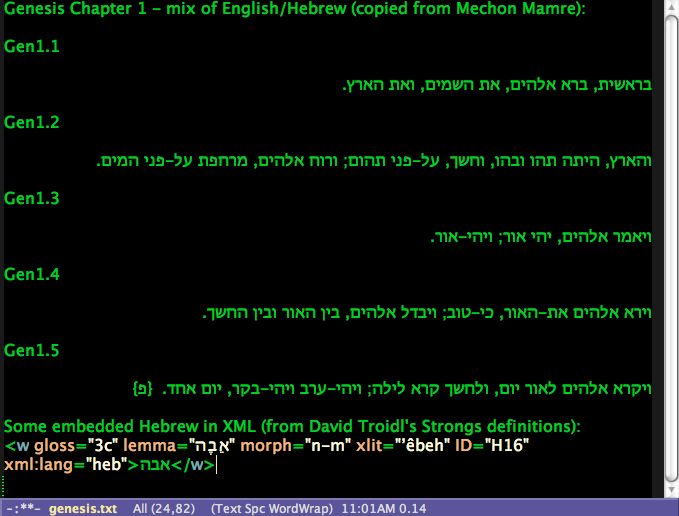
I use Emacs a lot - not just for programming, but for many other tasks as well. It has always irritated me that Emacs didn't support Hebrew text input and that I would have to switch to another editor whenever I needed to write something in Hebrew. Well, with Emacs version 24, that will change! I've been playing around with the development version of Emacs24 (actually, although I also tested on Emacs24, I've mostly been testing on the development version of Aquamacs which is Emacs packaged with a number of frequently-used extensions for use on the Mac) and have been impressed by how well Emacs is starting to support Hebrew input with proper BiDi display (due in large part to the work and perseverance over the past few years by Emacs developer Eli Zaretskii). Here is a screen shot to illustrate both a mixture of English and Hebrew lines of text and Hebrew embedded in an English XML code snippet (in both cases, the proper Left-To-Right (LTR) and Right-To-Left (RTL) display of the text is maintained):
At the moment, this is only available in the development version of Emacs/Aquamacs. Therefore, unless you're technically-savvy, you probably won't be able to use it until the next official release of Emacs (the above picture is just to whet your appetite!). However, any developers who want to give it a try can do so by downloading and building the Emacs development source. Here are the necessary steps for building the Aquamacs version: From a terminal, download and build Aquamacs24: git clone git://github.com/davidswelt/aquamacs-emacs.git cd aquamacs-emacs/ git checkout -t origin/aquamacs24 (note: depending on git version, you might need to do: git checkout origin/aquamacs24) ./build-aquamacs Then, drag the Aquamacs.app application from the nextstep directory to your Applications directory. Currently, bidi support is turned off by default in Emacs24 (this will change before the official release of Emacs24), so you will want to turn it on in your .emacs file: (setq-default bidi-display-reordering t) That's all you have to do to enable bidi support! Emacs will "automatically" recognize whether you're typing a LTR or a RTL language and display the text appropriately (according to the rules specified in the Unicode Bidirectional Algorithm (described in Annex 9 of the Unicode Standard)). You can "force" RTL or LTR text by either setting the "bidi-paragraph-direction" variable in Emacs or by using one of the standard mechanisms described in the Unicode Bidirectional Algorithm page; however, for the most part, you will just let Emacs DWIM. You can enter Hebrew by either enabling system-wide Hebrew input (e.g. - as described here for the Mac) or by enabling a Hebrew input method locally in Emacs (e.g. - using "C-x RET C-\ hebrew"). Most Emacs users will probably prefer the Hebrew input method approach as it allows you to continue using standard Emacs command keys while the system-wide overrides will affect command key usage. If you enable an Emacs Hebrew input method, you can toggle between Hebrew and your default language by pressing "C-\". Anyone wanting to read about the main design decisions that went into the development of bidi support in Emacs can read Eli Zaretskii's "Bidirectional editing in Emacs -- main design decisions" post on the emacs-bidi list archive.
This version fixes a couple of nasty bugs that caused crashes (including one that surfaced with the release of iOS 4). The new version is now available on the Apple App Store and I recommend that all current users download the upgrade (it's a free upgrade for existing users of the app). The changes:
Fix: Fixed bug when switching to Aramaic when in a non-Torah book.
Fix: Fixed crash (only on iOS 4) when changing Bible version.
Fix: On flipside view, moved buttons so that messages weren't obscured.